Claude OS Foundations
Build a Claude system that understands your work, follows your standards and guides you through repeatable workflows.
Claude OS Foundations gives you assistant-led setup, structured context, reusable Skills, practical Workflows, memory, guardrails and a clear system for organising your work. Built for individuals, founders and small businesses.
A$149 AUD. One payment.One payment · lifetime access to version 1 and updates
Editable system. Assistant-led setup. No coding required.
Casual Use vs A System
Claude is capable. Casual use wastes most of it.
Every conversation starts from zero
You repeat who you are, what you do and what good looks like — every single time.
Useful decisions and lessons get lost
That pricing decision or hard-won lesson lives in an old chat you'll never find again.
Outputs are inconsistent
The same request produces a different structure, tone and quality every time you ask.
Prompts stay disconnected
A folder of clever prompts is not a system — nothing builds on anything else.
Claude doesn't know what to read
Without a defined structure, it can't tell which of your files and standards apply to a task.
Finished work has no home
Outputs pile up in chats and downloads; context and memory clutter until both stop helping.
Assistant-Led Setup
You are not left alone with a folder of templates
Setup begins by pasting one included instruction into Claude. From there, Claude conducts the installation with you — asking one thing at a time, verifying as it goes, and taking you straight into real work.
- Claude confirms access to the product folder.
- You choose the Individual, Business or Hybrid pathway.
- Claude collects only the minimum context required to begin.
- Claude plays the context back for verification.
- Claude guides you through a real first Workflow.
- You review the output.
- Claude records a memory item only after your approval.
Prefer to set things up yourself? A complete written manual installation route is included and produces the same working system.
From the included setup instruction
The full instruction ships inside the product — paste it once and Claude takes it from there.
The First Wins Programme
Five wins that turn the system into something useful
You get value before the system is anywhere near complete. Each win proves one part of the method on your real work — not exercises.
Win 1
Claude understands your work
Complete the minimum context, then hear it played back in five bullets that sound like you.
Win 2
Claude applies your quality standards
Compare a generic output with a standards-guided one and see the difference your files make.
Win 3
Claude runs a reusable Skill
Research, planning, writing or admin — one defined capability, run on something you actually owe.
Win 4
Claude follows a complete Workflow
A recurring job runs as a process, stops at your review point, and files its output properly.
Win 5
Claude remembers approved lessons and decisions
One approved memory entry — and your next session starts already knowing it.
The J. Atlas Method
Six layers, one operating system.
Foundations installs the six-layer method J. Atlas teaches across More Capable — each layer a working part of the system, not a chapter in a book.
01
Context
What Claude needs to understand about you, your work and your priorities.
02
Memory
Approved decisions, preferences and lessons that should influence future work.
03
Skills
Reusable capabilities for tasks such as planning, research, writing and administration.
04
Connections
The files, knowledge sources and tools Claude may use — with your permission.
05
Workflows
Repeatable sequences that turn a task into a reviewed result.
06
Guardrails
Rules defining accuracy, privacy, approval and external action boundaries.
The Transformation
From a chat window to an operating system.
Before Foundations
- Disconnected chats and repeated explanations
- Outputs that vary wildly in quality
- Knowledge scattered across apps and inboxes
- No repeatable way to do recurring work
- Every improvement lost by next week
After Foundations
- Claude opens already knowing your context and standards
- Reusable skills produce consistent output on demand
- Your knowledge is structured and reachable
- Recurring work runs as reviewable workflows
- The system compounds — every week it knows more
How You Use It
From download to a running system.
Step 1
Download
Your access email delivers the complete system after payment.
Step 2
Open the folder
Unpack once, somewhere permanent — the folder is the product.
Step 3
Paste the setup instruction
One included instruction starts the guided installation.
Step 4
Choose a pathway
Individual, Business or Hybrid — it decides what loads first.
Step 5
Complete minimum context
Three files, collected in conversation. Everything else waits.
Step 6
Run the first Workflow
Real work, with your review point built in.
Step 7
Review and save
You approve; the output files itself in the right place.
Step 8
Keep building
The system grows week by week — it's editable and it's yours.
Reading Load, Honestly
You do not need to read or complete every file
Most of the product is Claude's instructions, editable templates and later reference material. Your reading list is short.
You read first
- Start Here
- Quick Start
- Choose Your Path
- Assistant-Led Setup
- First Wins
Claude reads for the task
- The main system instruction
- Your selected pathway context
- Your preferences and quality standards
- The required Skill
- The required Workflow
- Applicable guardrails
- Relevant memory
You complete later
- Additional context files
- More specialised Skills
- Additional Workflows
- Maintenance and reference files
101 editable Markdown files in total — depth you grow into, not a reading list.
Three Pathways
One system. Your situation.
All pathways use the same core system — the pathway changes which context and Workflows are prioritised.
Individual
Professionals, consultants, creators and ambitious individuals.
- Weekly planning
- Research
- Writing
- Learning
- Personal projects
- Decision support
Business
Founders, managers and small teams.
- Administration
- Meeting preparation
- Marketing production
- Internal knowledge
- Research
- Operating processes
Hybrid
Founders whose personal work and business overlap.
- Founder priorities
- Personal brand
- Product development
- Client work
- Business operations
- Multiple communication voices
Inside The System
A real file system, not a PDF of tips.
Foundations installs as a working folder structure on your machine — built around the practical principles J. Atlas uses to structure AI assisted work. Ten numbered modules take you from assistant-led installation to a maintained, compounding system.
- 00 START HERE — assistant-led setup and First Wins
- 01 CORE SYSTEM — your context foundation
- 02 MEMORY — what persists between sessions
- 03 SKILLS — nine packaged, repeatable capabilities
- 04 WORKFLOWS — ten recurring jobs with checkpoints
- 05 GUARDRAILS — permissions and human review
- 06 EXAMPLES — individual, business and hybrid builds
- 07 MAINTENANCE — keep it compounding
- 08 REFERENCE — glossary, commands, support
- 09 OUTPUTS — where your finished work lives
What Is Included
Everything you need. Nothing you have to invent.
The complete self-install system: assistant-led setup plus every template, skill file and workflow pattern you need to turn Claude from a chat tool into a working system built around you.
- Assistant-led installation (with a complete manual fallback)
- Five-step First Wins activation programme
- Individual, Business and Hybrid pathways
- The six-layer Claude OS architecture
- Structured context files for your work and standards
- Memory system with a full lifecycle — capture to archive
- Nine reusable Skills
- Ten practical Workflows with human review points
- Output filing and archive convention
- Two-stage voice application and verification
- Guardrails and human approval rules
- Three complete fictional worked examples
- Weekly, monthly and quarterly maintenance routines
- Troubleshooting and support guidance
- Six branded PDF guides
- The complete editable Markdown system (101 files)
- Version and licence files
Inside The Box
Real pages from the real product.
Branded PDF guides, a complete editable Markdown system and worked examples — previewed below from the actual v1.0 package.
The product
Quick Start Guide
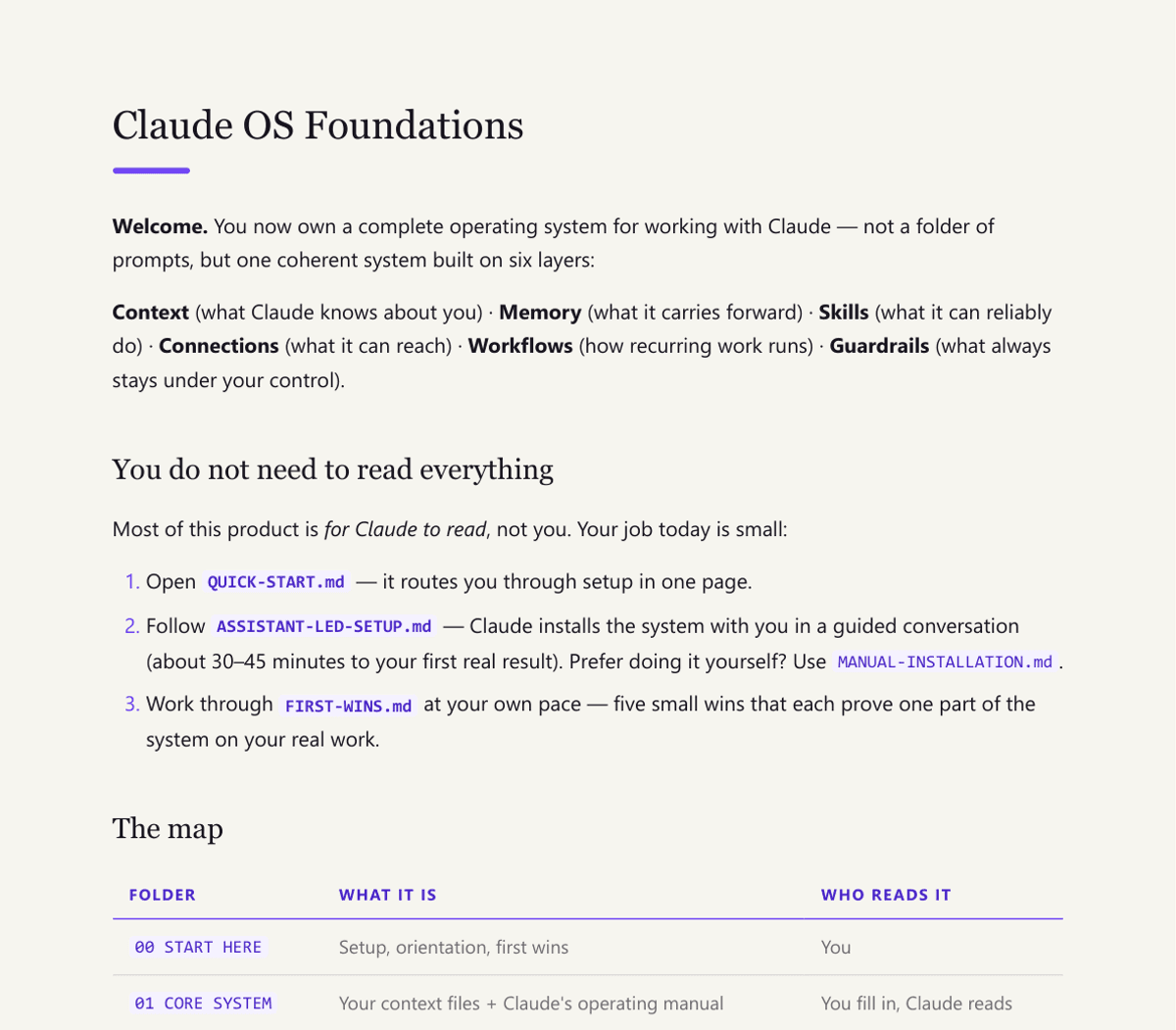
Start Here — inside
System Map
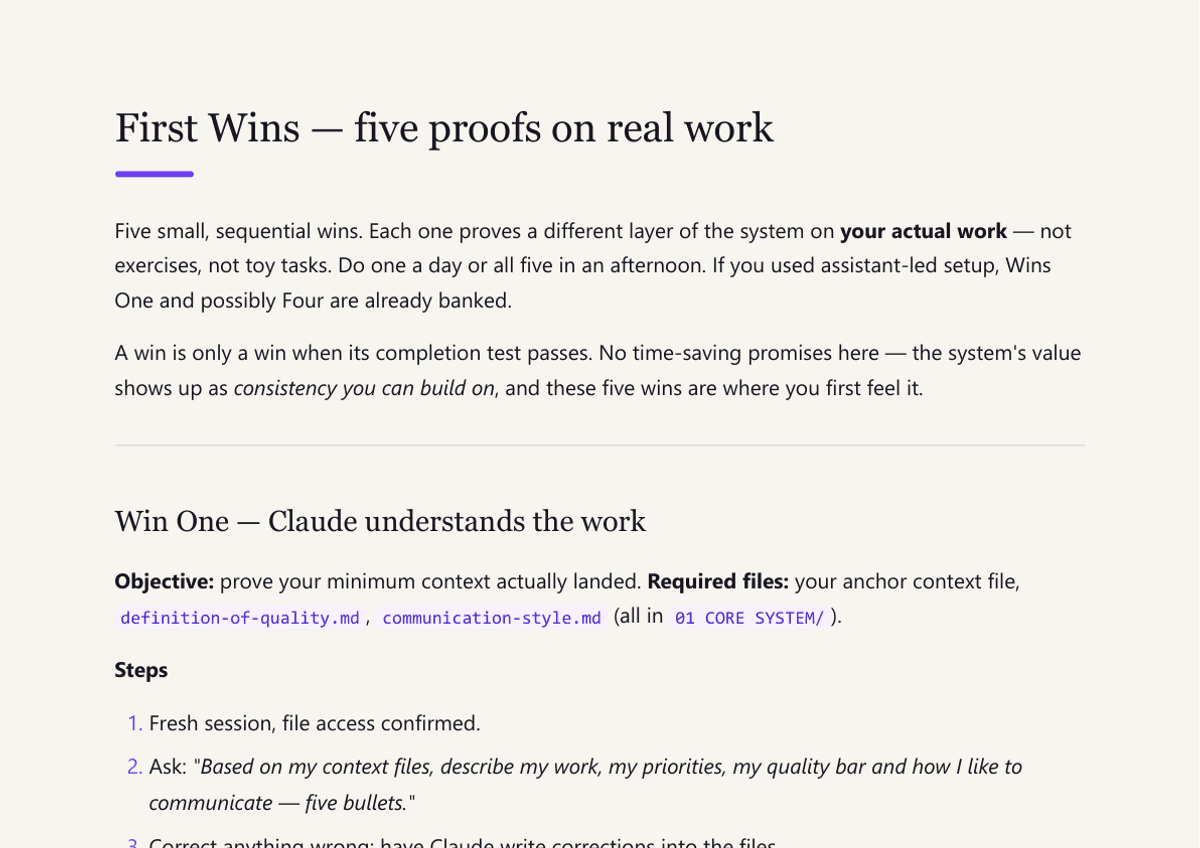
First Wins — inside
Installation Checklist
A good fit if you are
- An individual who uses Claude regularly and wants more consistency
- A founder organising personal and business work in one place
- A small business seeking repeatable AI-assisted workflows
- A consultant, creator or professional managing recurring knowledge work
- Willing to complete a guided setup and review Claude's work
Not a good fit if you want
- A fully managed implementation — that's Private Setup
- Claude acting autonomously without your review
- Results without downloading and organising files
- Industry-specific automation built for you
- Custom integrations, or legal / financial / medical decision automation
Need it diagnosed, configured and implemented with you? Explore the Claude OS Setup Intensive
What You Need
What you need
- A Claude account, and access to Claude Code or Claude Cowork with local folder access.
- Approximately 60 to 90 minutes for the initial setup.
A reduced manual workflow is included for customers without direct folder access, although the full experience works best when Claude can read and update the product folder. File access capabilities vary by Claude product and plan — check yours supports local folder access.
Choose Your Level
Free, Foundations or Private Setup?
Same method, three levels of help. Every level carries your work forward — nothing is wasted by starting small.
| Feature | Starter KitFree | FoundationsA$149 AUD | Private SetupA$1,250 AUD |
|---|---|---|---|
| Context templates | Starter templates | Complete template system | Written with you, live |
| Memory system | — | Full setup + maintenance | Configured for you |
| Skills | — | Six ready-to-adapt skills | Tailored to your work |
| Workflows | Discovery worksheet | Four complete patterns | Two built for your bottlenecks |
| Guardrails | Safety checklist | Full configuration guide | Set to your risk comfort |
| Guided setup | Written checklist | Assistant-led installation | Built with you, live |
| Direct support | — | Email support | Seven days direct access |
| Upgrade credit | — | A$149 credited to Setup (30 days) | Includes Foundations |
Upgrade credit
Your A$149 comes with you — for 30 days
Purchase the Claude OS Setup Intensive within 30 days of buying Foundations and your full A$149 AUD is credited against the Intensive price — you pay the difference, never twice. The credit applies once, for the original purchaser; private setup availability depends on current capacity.
Learn about the Setup IntensiveFoundations FAQ
Everything people ask before buying.
A structured operating system for working with Claude: a downloadable folder of context files, reusable Skills, practical Workflows, memory and guardrails, installed through an assistant-led setup. Claude reads the relevant parts for each task; you review and approve the work. It is delivered as a complete editable Markdown system with six branded PDF guides.
No. Prompts are single-use requests; this is a system. Your context, standards and memory persist between sessions, Skills define repeatable capabilities with quality bars, and Workflows run recurring jobs with review points. Nothing here is a list of clever one-liners.
No coding is required. You should be comfortable downloading a folder and following guided steps — Claude conducts the setup with you from one pasted instruction, and a fully written manual route is included.
No — Claude Code is one of two recommended environments. It picks the system up automatically when you start a session in the product folder, which makes it the smoothest technical route, but it is not required.
Yes. Grant the session access to the product folder and everything works — guided setup, Skills, Workflows and filing. The installation guide covers the exact steps.
Partially. Without local folder access Claude can't read and update your system files directly, so a reduced manual workflow is included: you keep the files open and paste relevant content in as needed. It works, but the full experience is designed around folder access via Claude Code or Claude Cowork. File access capabilities vary by Claude product and plan.
No — and you shouldn't try. You actively read five documents and fill in three context files to begin. Most of the product is Claude's instructions, editable templates and later reference material. The system is explicitly designed to start minimal and grow with use.
Plan for approximately 60 to 90 minutes to a working system and a first real result. That's planning guidance rather than a guarantee — it varies with your environment and how much context you want to give it on day one. Further customisation happens progressively.
No. Version 1.0 deliberately uses assistant-led setup, written guides and worked examples instead — the setup conversation adapts to your situation in a way a recorded video can't.
Yes — the Business and Hybrid pathways exist for exactly that, with a business context system, operational workflows like meeting preparation and monthly business review, and business-specific guardrails for client work.
The licence covers your personal work and use within one business you own or work within — including sharing customised working copies with colleagues inside that business. Reselling, redistributing outside that business or republishing the templates is not permitted.
Stripe confirms your payment, and your access email arrives automatically with a secure download link, getting-started steps and support details. Most emails arrive within minutes.
As a single ZIP download: the complete editable Markdown system, six branded PDF guides and the brand assets. You unpack it once to a permanent folder — that folder is the product.
Email support answered personally, plus in-product troubleshooting, common-mistakes and health-check guides. Version 1.x updates are emailed to every purchaser.
Same method, different journey. Foundations is the complete self-implementation system. The Claude OS Setup Intensive (A$1,250 AUD, by application) adds diagnosis, custom configuration, two workflows designed around your specific bottlenecks, implementation with you live, testing and seven days of direct support. Private setup availability depends on current capacity.
Yes. Purchase the Setup Intensive within 30 days of your Foundations purchase and your full A$149 AUD is credited against the Intensive price, so you pay the difference, never twice. The credit applies once, for the original purchaser; private setup availability depends on current capacity.
No. Claude OS is an independent educational framework created by J. Atlas and is not affiliated with Anthropic. It teaches you to organise and direct Claude — Anthropic's product — around your work.
Own the system, not the subscription.
One payment. Yours to install, adapt and run for as long as you work.
- Assistant-led installation
- Individual, Business and Hybrid pathways
- Nine Skills · Ten Workflows
- Six branded PDF guides
- The complete editable Claude OS system
- A$149 AUD · one payment · 30-day upgrade credit
Questions before or after you buy? Email support and a real person — J. Atlas — answers.
Payment is processed by Stripe; card details never reach this site. Your email is used to deliver your download and receipt. How your details are handled.
Claude OS Foundations is an independent educational product by J. Atlas and is not affiliated with Anthropic.